4Degrees vs Excel: Is a Spreadsheet Enough for Your Deal Team?

Excel is where most deal teams start. 4Degrees is where they move when the spreadsheet becomes the system of record.

Excel is a genuinely powerful spreadsheet, and this page will not pretend otherwise. The real question is narrower: once relationships, pipeline, and follow-ups become recurring, collaborative, and strategically important, should a spreadsheet still be the system your firm runs on?

Choose 4Degrees If...

  • More than one person depends on your pipeline, relationships, or follow-ups being current.
  • You want email and calendar activity captured automatically instead of remembered and retyped.
  • Reporting to partners or an investment committee has to be trustworthy without a cleanup project first.

Excel May Be Enough If...

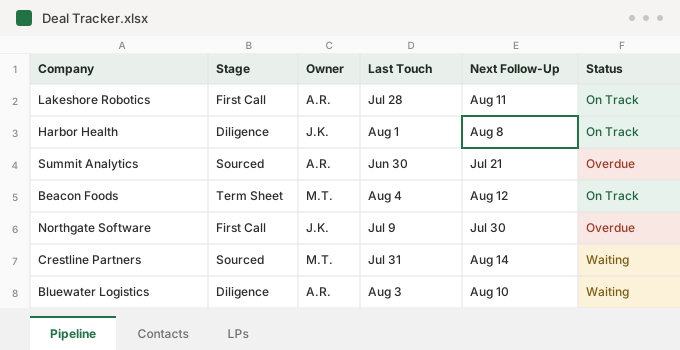
  • One person maintains a small list, and the work is mostly one-time analysis.
  • The project is temporary, and collaboration is minimal.
  • Missing an update costs little: no lost introduction, no stalled deal, no stale report.

What Each Platform Is

4Degrees

4Degrees is an AI-powered relationship intelligence CRM built for deal-driven teams: private equity, venture capital, investment banking, M&A, corporate development, commercial real estate, and consulting.

It captures email and calendar activity automatically, maps relationship strength, and surfaces warm introduction paths. Teams use it to run configurable deal pipelines, recurring follow-ups, reporting, and AI built on the firm's own deal context.

Microsoft® Excel®

Excel is Microsoft's spreadsheet: the standard tool for financial modeling, valuation, and analysis, and Microsoft describes it as optimized for data analysis and calculation.

With Microsoft 365, it supports real-time co-authoring, version history, Power Query data connections, automation through Office Scripts and Power Automate, and Copilot AI assistance with a qualifying license.

Microsoft and Excel are trademarks of the Microsoft group of companies. Excel details are drawn from Microsoft's public documentation reviewed on August 5, 2026. 4Degrees is not affiliated with Microsoft.

4Degrees and Excel, Side by Side

The comparison is not spreadsheet versus no spreadsheet. It is whether your relationships and pipeline live in software designed to manage them, or in worksheets your team maintains by hand.

Swipe to compare

Excel details drawn from Microsoft's public documentation as of August 5, 2026. Capabilities change; confirm current details with each vendor.
Category4DegreesExcel
Primary purposePurpose-built AI-powered relationship intelligence CRM for deal teamsGeneral-purpose spreadsheet, optimized for analysis and calculation
Contact, company, and deal recordsNative linked records: people, companies, deals, and interactions connect automaticallyFlat worksheets; linking records across sheets requires configuration and ongoing maintenance
Email and calendar activityCaptured automatically as the team worksManual entry; depends on team process
Relationship strength and warm pathsNative: strength scoring and warm introduction paths across the firm's networkNot available; teams ask around or search inboxes
Deal pipeline managementConfigurable pipelines with stages, owners, and reporting built in; workflows connect people and companiesBuilt from rows and tabs; stage conventions depend on team process
External Data RoomKeeps document sharing, requests, participants, and submitted-file review connected to the deal.Not Available
Recurring reminders and follow-upsNative recurring reminders on contacts and dealsRequires custom development (for example, Power Automate flows)
IntegrationsPurpose-built integrations across email and calendar, meeting notes, files and documents, team collaboration, data enrichment, workflow automation, AI tools, and browser and mobile extensionsAdd-ins, data connections, APIs, and Microsoft automation tools; CRM and deal-workflow integrations require configuration or custom processes
Data enrichmentAutomated enrichment inside the CRM from multiple integrated private-market and company-data sourcesExternal data can be imported or connected; enrichment must be configured, mapped, and maintained
Shared activity historyFirm-wide record of who knows whom and the activity captured on each dealDependent on what each person remembers to paste in
Data consistencyStructured fields on every recordFree-form cells; data validation exists but is configured and maintained per workbook
ReportingDashboards and reports built on records that update as the team worksPivotTables and charts are strong, but report quality depends on manual upkeep of the rows beneath them
AIAI built into the CRM, drawing on relationship, company, deal, meeting, note, document, and activity context. Included for every customer: no AI credits, tokens, usage fees, or usage limitsCopilot helps users analyze and work within the workbook; requires a qualifying Copilot license
Onboarding and migrationOnboarding, data migration, and an assigned customer success manager included in every subscriptionSelf-serve; workbook structure is yours to design, document, and maintain
Ongoing administrationVendor-managed platform with included onboarding and an assigned customer success manager; your team uses the system rather than maintaining itThe team or workbook owner maintains structure, formulas, permissions, automation, documentation, and data consistency

Why Deal Teams Start With Excel

Every deal professional already knows Excel. It is flexible, it is already licensed, and a contact tracker or pipeline sheet takes ten minutes to create. For a new fund or a two-person team, that is not a compromise; it is the sensible starting point.

Excel is also genuinely excellent at what it was built for: modeling, valuation, scenario analysis, and the number work deals run on. Nothing on this page argues your team should stop using it for that.

Where Spreadsheet-Based Deal Management Breaks Down

The spreadsheet does not break; the process around it does.

Upkeep Falls Behind

A pipeline worksheet is only as current as the last person who remembered to update it. Under deal pressure, data entry is the first thing skipped, so contacts go stale, deals duplicate across tabs, and each person keeps a private variant of the truth.

One File, Many Editors

When two people edit at once, Excel resolves the conflict by keeping the last change saved, and version history can only restore whole file versions, so nobody can say who changed a number or why.

Context Stays Scattered

The context that wins deals stays in inboxes, calendars, and the memories of whoever took the meeting. The workbook holds a fraction of what the firm actually knows.

Capture More Activity as Your Team Works

4Degrees automatically captures email and calendar activity and connects it to the right people, companies, and deals. That reduces spreadsheet retyping, keeps records more current, and gives reporting a stronger foundation across pipeline health, sourcing, team activity, and relationship coverage.

This captured history powers relationship intelligence, including strength scoring, warm introduction paths, and a shared view of who knows whom. It also preserves institutional memory by keeping years of interaction history visible on each company record.

4Degrees also connects with the tools your team already uses across email, calendar, meeting notes, market data, AI, and hundreds of additional apps through Zapier.

AI in a Spreadsheet vs. AI in a Purpose-Built CRM

Excel has real AI. Copilot in Excel can generate formulas, transform data, and build charts inside your workbook, and it is genuinely useful for analysis. It requires a qualifying Copilot license, and its context is the spreadsheet in front of you.

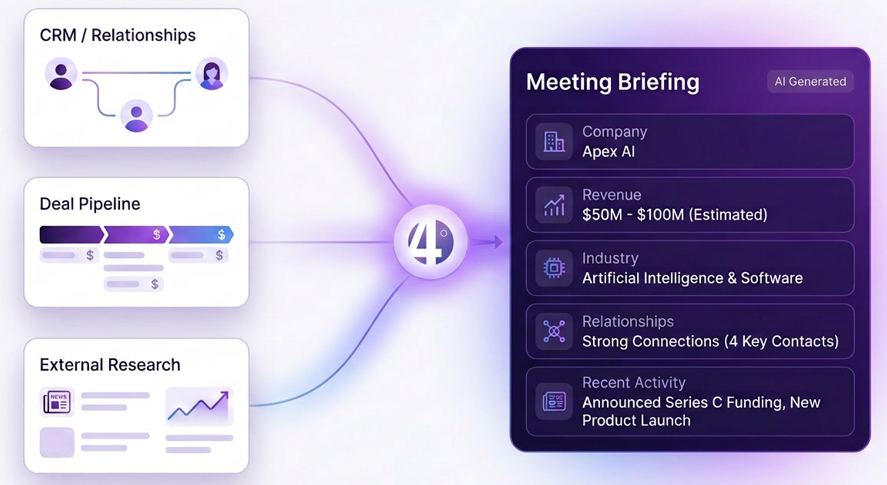
That is the boundary that matters: Copilot helps a person work inside a workbook. 4Degrees AI works across the relationship and deal context your firm has already captured: every contact, company, deal, meeting, and document.

What 4Degrees AI Includes

  • AI Assistant. Ask in plain language: "which companies in Chicago do we have a strong relationship with?" or "what is the latest on this deal?"
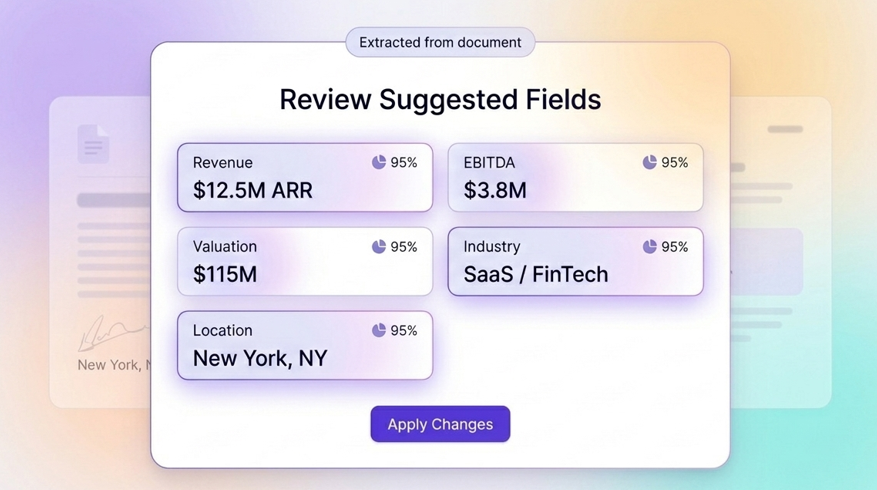
  • Document Intelligence. Pulls key deal data from CIMs, decks, and teasers into reviewable field suggestions; nothing is written until someone approves it.
  • MCP for ChatGPT and Claude. Connects your AI tools to 4Degrees context for briefings and research grounded in firm data.
  • Reviewable Field Suggestions. AI identifies relevant details in contact notes and suggests updates to the appropriate CRM fields for review before anything is changed. Your team stays in control of every update.
4Degrees Document Intelligence interface staging extracted deal fields, including revenue, EBITDA, valuation, industry, and location, for user review before applying changes
Document Intelligence stages extracted deal fields for review. Nothing is written to the CRM until a user applies the changes.
Diagram of 4Degrees combining CRM relationships, deal pipeline, and external research into an AI-generated meeting briefing
CRM relationships, pipeline context, and external research combine into an AI-generated meeting briefing.

Every 4Degrees AI capability is included for every customer: no AI credits, no tokens, no usage fees, no usage limits.

Excel May Be the Better Fit If...

Excel can still make sense in a few limited situations:

  • One person is maintaining a small list, and the work is primarily one-time analysis rather than an ongoing process.
  • The project is temporary: a single fundraise tracker, a one-off buyer list, a working file for a live model.
  • Collaboration is minimal and missing an update has little business consequence.
  • You have no need for relationship intelligence or recurring follow-up management.

That can work at a very small scale. Once multiple people, active pipelines, recurring follow-ups, sensitive relationship history, or firm-wide reporting are involved, the spreadsheet is being asked to do a job it was not designed for. This is a maturity threshold, not a tie.

Stylized illustration of a simple spreadsheet deal tracker with company, stage, owner, last touch, next follow-up, and status columns
For one person and a short list, a simple tracker like this can be enough.

Moving From Excel to 4Degrees

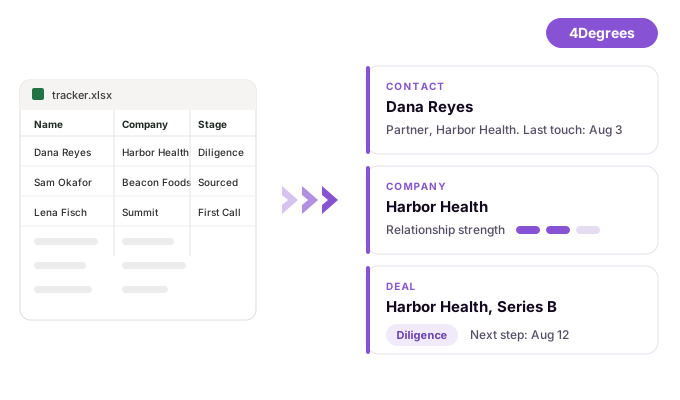
Moving from Excel is often simpler than teams expect because the spreadsheet already provides the starting inventory. Data migration is included in every 4Degrees subscription, and the onboarding team maps contacts, companies, and deals into structured records while configuring pipelines around your workflow.

A typical average-size implementation is usable in under two weeks, with an assigned customer success manager from day one. Recurring reminders and configurable pipelines take over the follow-up management previously left to memory, while Excel remains available for analysis and modeling.

Ask us to map your current spreadsheet into a 4Degrees migration plan.

Illustration of spreadsheet rows becoming structured 4Degrees contact, company, and deal records
Spreadsheet rows become structured contact, company, and deal records during onboarding.

The Bottom Line

If your firm's relationships and pipeline are managed by one person in one small sheet, keep the sheet. For everyone else, the spreadsheet era usually ends the same way: a missed follow-up, a forgotten warm path, or a pipeline review nobody fully believes.

4Degrees replaces the spreadsheet-as-CRM with a system that captures activity automatically, keeps more of your relationship and deal context current, and makes reporting far less dependent on manual data entry. Excel goes back to being what it is best at.

Frequently Asked Questions

Can Excel work as a CRM?

For one person tracking a small list, yes: a well-kept worksheet can be enough. What changes with a team is maintenance: every contact, meeting, and stage change must be entered by hand, and shared workbooks resolve conflicting edits by keeping the last change saved. Purpose-built CRMs exist to remove exactly that dependency.

Do we stop using Excel if we adopt 4Degrees?

No. Excel remains the right tool for modeling, valuation, and analysis. 4Degrees replaces the spreadsheet only as the system of record for relationships, pipeline, and follow-ups, and your deal data stays exportable for the analysis work Excel is built for.

Does Excel have AI too?

Yes. Copilot in Excel can generate formulas, transform data, and build charts, with a qualifying Copilot license. The difference is context: Copilot works with the workbook in front of you, while 4Degrees AI draws on the relationships, deals, meetings, and documents your firm has already captured. All 4Degrees AI is included for every customer.

How long does it take to move off spreadsheets?

Data migration is included in every subscription, and a typical average-size implementation is usable in under two weeks. The onboarding team maps your spreadsheet's contacts, companies, and deals into 4Degrees, and an assigned customer success manager runs the process with you.

How much does 4Degrees cost?

4Degrees uses clear per-user monthly pricing, and every subscription includes onboarding, data migration, a customer success manager, and all AI features with no AI credits, tokens, or usage fees. See current plans on the 4Degrees pricing page, or get a quote matched to your team.

Can 4Degrees connect to ChatGPT and Claude?

Yes. MCP connectivity is included in every subscription, so tools such as ChatGPT and Claude can work with your firm's relationship data, deal history, and pipeline activity. Briefings and research are grounded in your own context instead of a pasted-in spreadsheet.

Is our data safer in a spreadsheet?

A spreadsheet can be shared securely, but security is only part of the question. Deal pipelines and relationship histories also require controlled access, consistent records, and a reliable firm-wide system of record. See the 4Degrees security page for current information about security, compliance, and data handling.

See Your Spreadsheet as a 4Degrees Pipeline

Bring the spreadsheet you run deals on today. We will show you the same pipeline in 4Degrees, with automatic activity capture, warm paths, and reporting built in.

Schedule a demo